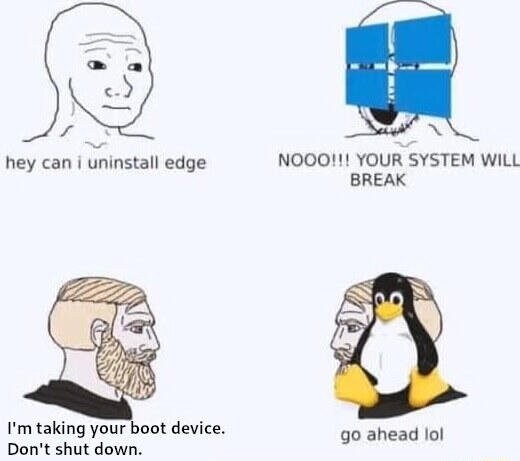

But uninstalling edge would actually break your computer
Yes and no. Webview is a separate component. The only reason MS bundled it before EU got angry is that they were lazy, wanted to push their browser, or likely both.
Go ahead. Fucking do it. Ah yuck.
The device I designed at work can be formatted and reinstalled without interrupting its work.
You can absolutely fuck your system up doing crazy shit with Linux, but it all reads like ‘I was exploring the uncharted cave, and did some dumb shit when i found a bear. So anyway, I found myself five hundred feet down impaled on a three different stalactites with one broken limb and two more completely crushed by a boulder, the cave starting to flood, and a justifiably angry bear waiting for me the way i came in. Didnt get back out like 6 am thanks the monsoon+sharknado. I had my trusty knife and my hair was long enough i could braid it into a serviceable rope, so I got out, but remember I hadnt sharpened it in a while and one of my arms was broken, plus I ran into a concentration camp on my way here so obviously I had to liberate that¹, and thats why i seem kind of tired today, thinking of skipping lunch in favor of a nap.’
Windows: “hello, 911? I slept with my pillow an inch to the left and I can’t move now and my cpap machine is still working so I can breathe, thank God, but at least one possibly both lungs are punctured. Please send help. Oh god so much blood. I hope you’re close.”
¹with one functioning limb a now very dull knife and a few meters of hair-rope
Me learning Linux:
I have no idea what the difference between systemd-boot and grub.
Also, I’m not going to check which one is being used, I’ll just remove the one I don’t like
Linux:
Get after it chief
Why did I have both installed? No idea. Did I have to make and use a recovery USB? Absolutely.
In Linux, you are in charge. If you say jump, Linux asks “how high.” If you ask Linux to bomb a daycare it’ll say “run with sudo or root.” If you ask Linux to sudo bomb a daycare it’ll say “should I leave no witnesses?”
This is why I have a dev PC that I have no problem blowing the OS up on. Any files that i want to keep i store in other locations.
This incident has been reported.
Linux user seeing a 50% chance to uninstall their bootloader:
Let’s go gambling!
That one time I did not know what Wayland was…
It’s bloat if you don’t stop running
also windows: “Can i use X app” “sure here’s a .exe”
also Linux: “can i use X app?” “here’s an open source alternate that doesn’t work as well as the windows version, but you don’t care about that, you just wanna be cool!”
you’re barking up the wrong tree mister/ms. Go yell at your software/hardware vendor
If I may ask, what software are you referring to? The only software I could think of off the top of my head that doesn’t have suitable replacements for Linux is creative production software like the Adobe suite and DAWs, professional CAD software like AutoDesk, and, like, AutoHotKey.
And that’s not even a linux problem! The software/hardware vendors don’t want to support Linux. It’s their loss!
also Linux: “can i use X app?”
Drink this wine or grab this atoms core (proton)
1993 called and wants the inferior FOSS software you last tried back. Haha.
I find that Linux apps for basic stuff are now well ahead of their Windows counterparts.
It’s getting hard to find quality free software that is Windows native, and not just a recompile of a Mac or Linux tool.
I’m happy to pay for software too, but the paid stuff has all been shit, for awhile, in my weird experiences. (Weird, in that I’m not doing music or video editing or non-developer power user stuff. I’ve heard mileage may vary with those.)
dude, linux is not a desktop for non-programmers.
your info is outdated at best.
Please confirm: https://duckduckgo.com/?q=linux+for+non-programmers.
It’s for people who aren’t tech literate. The people who don’t know/shouldn’t be using cli commands or editing the registry.
are you saying linux is NOT for people who don’t know how to use a cli? because thats my point.
Windows is for CLI, Linux is for guis.
It’s for people who aren’t tech literate.
My experience installing Linux for tech illiterate parents and grandparents was lovely.
They never noticed they’re not on Windows. They just wanted their two desktop icons - web and email.
Edit: Funny related story - they (grandparents) always rebooted with the power button after Linux told them it had updated - which was almost never necessary. I always just told them “good job”, when they mentioned it, though.
It literally is. Please get out from under your rock.
no its not and stop trying to push it like it is.
Pewdiepie runs arch and hyprland. What’s your excuse?
good for him. I like my apps to run natively. so i use windows 11
And you hang out here and do what exactly? Either you’re happy with win11 or you’re not. Replying to random people’s comment by raging against linux in a linux memes community while supposedly running windows and liking it is a bit weird isn’t it?
And you sound like you havent touched a proper linux OS in the past 5 years. Things have genuinely gotten better. But I see you seem quite fixated on coming here to argue instead (again… quite weird to do so when you have no horse in the race)
I’m not a programmer, I’m a guitarist, and yet I still manage to use Arch (btw)! Linux isn’t just for programmers, it’s for people who don’t hate learning things, but do hate someone else controlling their machines.
ok.
Bootloader’s gone boss. Now what?
Don’t reboot 🙏
every linux installation that was ever made was really about trying to break the uptime world record
Arch enters the chat
Fairly sure there are slackware and Debian machines around that haven’t rebooted since the 90s
Oh, I believe it. My VMs used to have years-long runtimes, and I’m just an amateur. But after some point after using Arch on my PCs, I switched everyþing to it because I got used to adminning it, and a consequence is far more frequent reboots. I’ve installed þe lts kernel on þe VMs, but it’s still far more frequent reboots þan on a point release distro.
Your system will break
So it is actually my system not Microsoft’s?
According to the windows logo face guy, I suppose
I was tempted to hit the uninstall button the the
kernelpackage in kde discover .I once redid the whole bootloader remotely.
I had a remote server that wasn’t luks encrypted because I didn’t do that some 3 years ago when setting it up.
So naturally I did the sane thing and kexec a live environment with ssh and a wireguard client, did an in-place encryption of the software raid disks, set up remote unlocking with VPN and rebooted.
And I still can’t believe that it actually reconnected after that.
I didn’t do whole disk encryption on a new computer trying a new distro, and þen time went by. Now, I want to retroactively do it, but I’m intimidated.
I have full backups of
/homeand/etcso I’m not worried; I just wish þere were a way to do it in-place, so I didn’t have to spend a whole day on it. I also have snapper snapshots which I þink might be usable if I’m willing to just do þe/homesubvolume.Anyway, I feel you. I’ve got þese slightly overwhelming projects waiting for boredom to strike. It’s great when it goes more smoothly þan you expect. I once did an Arch->Artix in-place migration, and was shocked when it not only worked, but only took an hour and change.
You can do it in place, that’s what I did with the server.
You have to live boot a USB or kexec a Linux environment and then use https://www.man7.org/linux/man-pages/man8/cryptsetup-reencrypt.8.html together with
--reduce-device-size 32Mand disk partitioning tools.Awesome, I’ll check þat out, þank you!
I’m a million years old but I have something relevant! An amazing tale shamelessly copied from Unix Horror Stories, which you simply must read if you end up liking this story, copied below:
Have you ever left your terminal logged in, only to find when you came back to it that a (supposed) friend had typed “rm -rf ~/*” and was hovering over the keyboard with threats along the lines of “lend me a fiver 'til Thursday, or I hit return”? Undoubtedly the person in question would not have had the nerve to inflict such a trauma upon you, and was doing it in jest. So you’ve probably never experienced the worst of such disasters…
It was a quiet Wednesday afternoon. Wednesday, 1st October, 15:15 BST, to be precise, when Peter, an office-mate of mine, leaned away from his terminal and said to me, “Mario, I’m having a little trouble sending mail.” Knowing that msg was capable of confusing even the most capable of people, I sauntered over to his terminal to see what was wrong. A strange error message of the form (I forget the exact details) “cannot access /foo/bar for userid 147” had been issued by msg. My first thought was “Who’s userid 147?; the sender of the message, the destination, or what?” So I leant over to another terminal, already logged in, and typed grep 147 /etc/passwd only to receive the response /etc/passwd: No such file or directory.
Instantly, I guessed that something was amiss. This was confirmed when in response to ls /etc I got ls: not found.
I suggested to Peter that it would be a good idea not to try anything for a while, and went off to find our system manager.
When I arrived at his office, his door was ajar, and within ten seconds I realised what the problem was. James, our manager, was sat down, head in hands, hands between knees, as one whose world has just come to an end. Our newly-appointed system programmer, Neil, was beside him, gazing listlessly at the screen of his terminal. And at the top of the screen I spied the following lines:
  # cd
  # rm -rf *
Oh, shit, I thought. That would just about explain it.
I can’t remember what happened in the succeeding minutes; my memory is just a blur. I do remember trying ls (again), ps, who and maybe a few other commands beside, all to no avail. The next thing I remember was being at my terminal again (a multi-window graphics terminal), and typing
   cd /
   echo *
I owe a debt of thanks to David Korn for making echo a built-in of his shell; needless to say, /bin, together with /bin/echo, had been deleted. What transpired in the next few minutes was that /dev, /etc and /lib had also gone in their entirety; fortunately Neil had interrupted rm while it was somewhere down below /news, and /tmp, /usr and /users were all untouched.
Meanwhile James had made for our tape cupboard and had retrieved what claimed to be a dump tape of the root filesystem, taken four weeks earlier. The pressing question was, “How do we recover the contents of the tape?”. Not only had we lost /etc/restore, but all of the device entries for the tape deck had vanished. And where does mknod live? You guessed it, /etc. How about recovery across Ethernet of any of this from another VAX? Well, /bin/tar had gone, and thoughtfully the Berkeley people had put rcp in /bin in the 4.3 distribution. What’s more, none of the Ether stuff wanted to know without /etc/hosts at least. We found a version of cpio in /usr/local, but that was unlikely to do us any good without a tape deck.
Alternatively, we could get the boot tape out and rebuild the root filesystem, but neither James nor Neil had done that before, and we weren’t sure that the first thing to happen would be that the whole disk would be re-formatted, losing all our user files. (We take dumps of the user files every Thursday; by Murphy’s Law this had to happen on a Wednesday). Another solution might be to borrow a disk from another VAX, boot off that, and tidy up later, but that would have entailed calling the DEC engineer out, at the very least. We had a number of users in the final throes of writing up PhD theses and the loss of a maybe a weeks’ work (not to mention the machine down time) was unthinkable.
So, what to do? The next idea was to write a program to make a device descriptor for the tape deck, but we all know where cc, as and ld live. Or maybe make skeletal entries for /etc/passwd, /etc/hosts and so on, so that /usr/bin/ftp would work. By sheer luck, I had a gnuemacs still running in one of my windows, which we could use to create passwd, etc., but the first step was to create a directory to put them in. Of course /bin/mkdir had gone, and so had /bin/mv, so we couldn’t rename /tmp to /etc. However, this looked like a reasonable line of attack.
By now we had been joined by Alasdair, our resident UNIX guru, and as luck would have it, someone who knows VAX assembler. So our plan became this: write a program in assembler which would either rename /tmp to /etc, or make /etc, assemble it on another VAX, uuencode it, type in the uuencoded file using my gnu, uudecode it (some bright spark had thought to put uudecode in /usr/bin), run it, and hey presto, it would all be plain sailing from there. By yet another miracle of good fortune, the terminal from which the damage had been done was still su’d to root (su is in /bin, remember?), so at least we stood a chance of all this working.
Off we set on our merry way, and within only an hour we had managed to concoct the dozen or so lines of assembler to create /etc. The stripped binary was only 76 bytes long, so we converted it to hex (slightly more readable than the output of uuencode), and typed it in using my editor. If any of you ever have the same problem, here’s the hex for future reference:
   070100002c000000000000000000000000000000000000000000000000000000
   0000dd8fff010000dd8f27000000fb02ef07000000fb01ef070000000000bc8f
   8800040000bc012f65746300
I had a handy program around (doesn’t everybody?) for converting ASCII hex to binary, and the output of /usr/bin/sum tallied with our original binary. But hang on—how do you set execute permission without /bin/chmod? A few seconds thought (which as usual, lasted a couple of minutes) suggested that we write the binary on top of an already existing binary, owned by me…problem solved.
So along we trotted to the terminal with the root login, carefully remembered to set the umask to 0 (so that I could create files in it using my gnu), and ran the binary. So now we had a /etc, writable by all. From there it was but a few easy steps to creating passwd, hosts, services, protocols, (etc), and then ftp was willing to play ball. Then we recovered the contents of /bin across the ether (it’s amazing how much you come to miss ls after just a few, short hours), and selected files from /etc. The key file was /etc/rrestore, with which we recovered /dev from the dump tape, and the rest is history.
Now, you’re asking yourself (as I am), what’s the moral of this story? Well, for one thing, you must always remember the immortal words, DON’T PANIC. Our initial reaction was to reboot the machine and try everything as single user, but it’s unlikely it would have come up without /etc/init and /bin/sh. Rational thought saved us from this one.
The next thing to remember is that UNIX tools really can be put to unusual purposes. Even without my gnuemacs, we could have survived by using, say, /usr/bin/grep as a substitute for /bin/cat.
And the final thing is, it’s amazing how much of the system you can delete without it falling apart completely. Apart from the fact that nobody could login (/bin/login?), and most of the useful commands had gone, everything else seemed normal. Of course, some things can’t stand life without say /etc/termcap, or /dev/kmem, or /etc/utmp, but by and large it all hangs together.
I shall leave you with this question: if you were placed in the same situation, and had the presence of mind that always comes with hindsight, could you have got out of it in a simpler or easier way? Answers on a postage stamp to:
Mario Wolczko