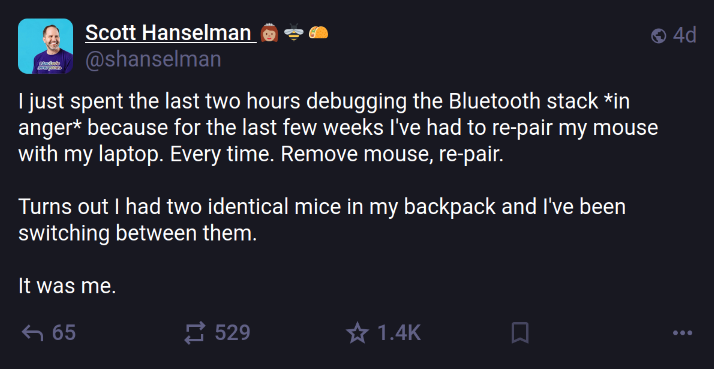
Why two? Depends on the mouse.
Probably wireless, andyou use one until it dies and then switch to your backup while the other charges (e.g. Apple’s Magic Mouse).Edit: I am so effing stupid. 😂
Probably wireless as I don’t think the Bluetooth cable has been invented yet
😅 I knew that! 😅
Easy solution: wired mouse
You’ll never keep me tied down like that.
Or, you think you lost one and get the second, but the original was tucked into some zippered sub-pouch all along.
Or you accidentally took one from a colleague. Easy mistake when IT gives the same model to everyone.
My mouse suddenly started EATING batteries. I thought it was going bad but while watching a movie I noticed the pointer showing up. When I re-did my sound system I added a sub-woofer UNDER the desk. It was moving the desk enough with sound to keep waking the mouse up. I had to get a wired mouse. The sound is GOOD.
I use my mice at over 20k dpi, and for the longest time the sensors got increasingly more accurate but still had the rare wiggle. Especially with cars driving by.
To stop my system waking I first started turning the mouse upside down, but later instead propped it half up on the rim of my keyboard. That latter is really quite convenient, might also work for you.I bet that sound was good. I’d still deal with turning my mouse off or plugging it in when not in use before I give up a wireless mouse.
I’m old, I don’t have that kind of energy.
If it’s always plugged in anyway… Why bother? Wired mice are cheaper for the same quality compared to wireless
Plugged in whenever it’s not in use. Unplugged while in use. That keeps it charged but lets you be untethered while using it.
I’ve never been in a situation where I’ve been using my computer and thought to myself “this is nice, but, I wish I could do this same thing, but from further than 12’ away so I can squint.”
Who are these people that need to be “untethered” while using a computer. Laptop, I can see.
It’s not about being far away. It’s about not having the drag of the cord pulling on the mouse or potentially snagging. It makes a difference in games.
Latency makes a difference in games. Cable management sounds like it’s needed in this case.
Latency of modern wireless mice is imperceptible, especially with proper receiver placement. My keyboard has a USB port on the top edge to plug the mouse receiver into so they’re right next to each other.
i have an old pc hooked up to my tv for emulation and piracy. it’s nice to use from across the room.
This is now not a situation where it’s just sitting at your desk though… I was referring to when it only sits at your desk, obviously…
And Hathaway was asking why people use wireless interfaces. Which I answered. I’m not sure what you’re point is with this.
Ah, yeah. Okay that’s fair.
- I don’t have room on my desk for a mouse bungiee
- If I had wired mouse I would have to fish the cable from behind my desk every time I leave for work, and then reroute it again after I come home
- The mouse I have only needs to be recharged every 2-3 weeks or so even with heavy use
If it’s always plugged in
I have an old laptop I use as a server, it sits on top of a cabinet in the corner of my room. One day I noticed it seemed like the space key was being held down all the time, but only past the login screen. I was about to buy a new laptop because I thought the keyboard was totally broken (and its kind of old anyway). Turns out an old Bluetooth keyboard in my closet that was paired to my laptop got switched on at some point and the space bar was being pressed.
To be fair, Bluetooth is a clusterfuck of a stack to use.
This is the user who submits bug reports to my projects.
In reality Scott is a legend
Those things breed pretty quickly.
Of Mice and Men
I always enjoy seeing the double asterisk in places where that formatting doesn’t work. It’s like ahh I know you type elsewhere often enough that it has become part of your “style” of writing lol
Right?
It’s the other way round: I don’t know if it applies to this fella, but /we/ used ** // and __ long before applications knew what that’s supposed to mean. We’ve been using it even on devices that are _physically_ incapable of producing formatted text, so it was the readers responsibility to parse and understand what it’s supposed to mean. Back in those days we’d also type :'-( instead of 😢.
It actually annoys me that markdown got it all wrong, and thus applications using markdown do it all wrong as well:
*foo* should be bold, not italic
/foo/ should be italic, not just /slashes/
_foo_ should be underlined, but for lemmy that’s just another way of saying italic, underlining seems to be outright impossible.Why? :'-(
hear hear
Underline used to be manual proofreader markup for something that was supposed to be italicized.
¯\_(ツ)_¯
I see what you did there.
Just incase, take this: /
Thanks! /¯\_(ツ)_¯
Confusion with web links? Honestly spittballin’ here
Back in those days we’d also type :'-( instead of 😢.
I still do! Fuck the pictures!
Unless it’s 🤮
That one really just gets the point across really well lol
💀
TBF I don’t want you to make text bold or underlined on my screen. You gotta work for it if you mean it, and it’s still likely that I will collapse your comment on sight and move on. Deal with it.
The double asterisk was part of the netiquette era of internet. As well as underscores and all caps.
*zout slaps RhuematoidArthritis with a large trout*
It was believable though, because bluetooth has always been randomly a nightmare.
Oh man… this sounds like something I would do. I feel for you.
So this doesn’t make sense to me. My computers let me pair more than one device at a time. You just have to pair them the one time and it remembers it after that.
Why is he re-paring over and over?
Could have been coupled with a dongle that only pairs to one device at a time.
idiot tax for having a dongle
Heh heh hm. Hem heheh heh - you said “dongle”. heh heh Hm hm heh
Since he didn’t realize it was a different mouse, he would never have tried pairing it without first removing the other mouse.
Since he would have always thought it was the same, already paired, mouse.
This is not the magic of buying two of them
Well you usually use the magic to take one apart to show how it works, no?
I had a problem with my Bluetooth mouse where it would the device would have a tiny half second lag when moving it after sitting still for about 10 seconds. It took me a lot of on and off troubleshooting before I found out that Windows was putting the Bluetooth driver itself into sleep mode. Don’t ask me why Microsoft decided the default of that a Bluetooth driver needed to be put to sleep while plugged… But I’m sure those milliamps of power really improved performance /s
You need every bit of juice, you wouldn’t want telemetry to miss any of your keystrokes and send that info to microsoft all incomplete. Think of all the productivity losses if one of the dozens of react appplications running on idle were to lag even more than they already do!
I spent some hours trying to fix my wifi that had suddenly stopped working on my laptop. It was very confusing and I just didn’t understand
There was a wifi button you could toggle with a function key… it was me
mine had a dedicated switch for that. on the front. so if you use your lap, you often toggle the switch.
All the help forums I searched to find an answer… and the one that got me was (paraphrasing),
“Hey, I know this sounds dumb. But do you have a wifi switch maybe? Is it an HP?”
And it all clicked… along with the issue, as soon as I toggled the switch. A lesson was learned that day lol
Omg, this was common on dell laptops that had the toggle switch on the side, nearly everyone hit it off when putting/removing it from their bags. And would freak the fuck out when they got to the office an hour before everyone else, including IT.
I hate people. You don’t have to be a computer person, but use some basic troubleshooting and common sense.
I have a picture saved of a laptop camera with the lens cover open so I can reply to anyone’s ticket saying their camera is “black”.
It usually is the user. I know, because that user is me.