

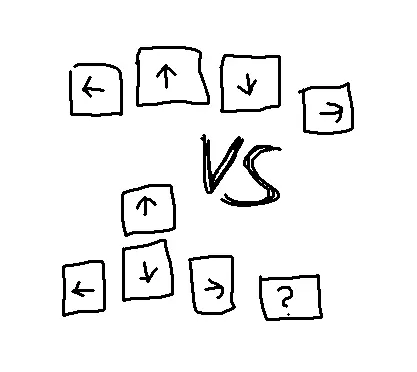
How do you like to bind your arrow keys, and why?
Ergo boards don’t typically have dedicated arrow clusters, so we’re left to bind them on some alternate layers one way or another.
Here are two prevalent layouts, along with some initial thoughts:
Homerow
Binding them linearly to a homerow on some layer.
Pros
- Arrows directly underneath your fingertips
Cons
- Less intuitive
- Pinky may be weaker when going right repeatedly
Pyramid
Bind arrows in a traditional pyramid shape, likely based on a homerow as well.
Pros
- Familiar layout
- Extra key available for pinky, e.g. a tab might be handy
Cons
- Finger movement required for up arrow
- Takes space on the row above, which might matter if you’d like to have a full row of other things there
Post pic is original art by the author, public domain, commission queue is already full.
The inverted T is god-damned masterpiece, regardless of where it’s placed. Your middle finger is already longer than the others and naturally rests closer to the top edge of the down arrow, requiring a minimal amount of movement to get to the up arrow. This is why it outlasted cross-nav and various godawful clusters or shift-pairs like on early 8-bit home computers, and why it never faced a serious challenge from layout-complicating diamond-nav or “does it exactly backwards” T-nav. It’s also more intuitive than 4-key linear nav, though fair play to you if your brain can make it work. I do tend to think that some folks make a commitment to staying on the home row that goes way beyond the strict needs of carpal tunnel health, but I’m a row-stagger heathen so take my thoughts for whatever they’re worth.
Excellent point about the middle finger lenght.