I’m not looking for Chromecast but I have a Linux system hooked up to a TV and ether net. I want a way to pick a YouTube or Amazon prime or Netflix video on my phone and display it on the TV via the Linux pc. Is that possible? If so what software can do it?
You must log in or register to comment.
Miracast (e.g. vis Miraclecast on linux) is a wireless standard for streaming video and audio from one device to another however this is not quite what youre talking about. Miracast basically runs the video on your phone and uses a remote device as a display via wifi. Chromecast actually mostly sends a link to a google device and then launches it on the device to play; there isnt a direct replacement to that. You could run Chrome or Chromium and cast to the browser but im not sure it’d work like a chromecaat device running the video locally.
I have a living room linux PC and I generally use Firefox on my phone and the PC to send links/tabs via firefox sync.
In addition KDE Connect (app on phone and also running on your linux PC) allows you to interact with your PC directly via your phone. You can send files back and forth, but also control media, share the clipboard, and send URLs from your phone to your PC to open in your default browser. This should work for Youtube and Netflix etc.
I personally usually send a tab to my firefox browser via firefox sync, but you could also share link instead via android share to the KDE connect app which will send it to your device and it should open in you’re default browser.
Also fyi KDE Connect doesnt need KDE to work - it works with any desktop environment.
I’m hoping to do this as minimal as possible as the “Linux pc” is just an old raspberry pi.
Chromecast actually mostly sends a link to a google device and then launches it on the device to play; there isnt a direct replacement to that.
I’m aware of one project called ScreenInvader but it’s unmaintained since about a decade. It offered a web UI where you could paste a URL from any device:
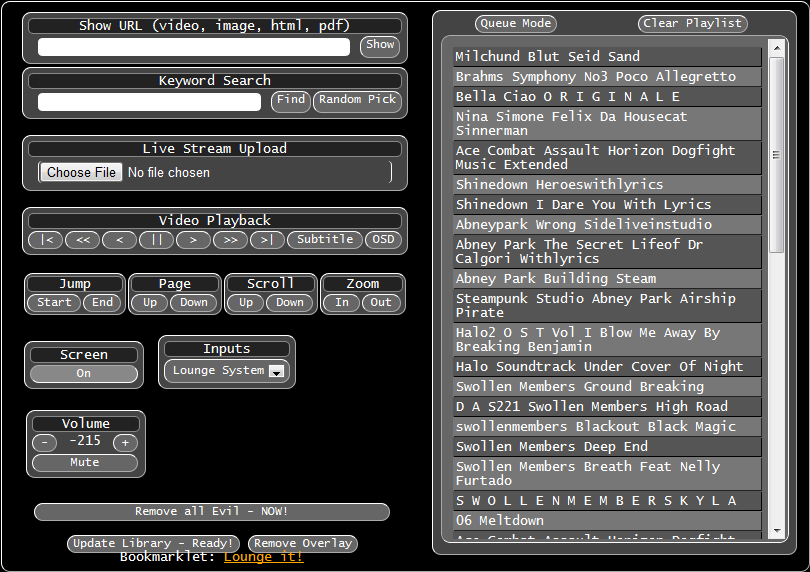 As you can see the UI was clunky and I guess it’s part of the reasons why it died. Too bad, I like the concept of having a jukebox at a party where people can just contribute to without installing anything, let alone sign up for an account.
I’ve been using macast for the past 5-6 years and I’ve been looking for a replacement but none seems to pop up. the thing @Ephera@lemmy.ml mentioned looks interesting, might try to recreate.
anyhow, you let it run on your media-PC and you send it stuff from your phone - video urls (not limited to youtube), actual video files, since it’s a DLNA sink you can connect jellyfin clients to it, etc. on your phone you need allcast (not on the play store no more, get an archived apk from apkmirror or sumsuch). behind the scenes it uses yt-dlp and mpv to play back the video, full screen if you set it up so.
it mostly works fine, needs the occasional restart when it ran too long and it’s not aware of already playing stuff, like if there’s jellyfin-media-player already playing something, it would be cool if it would pause it and resume after video.
I feel this should be a functionality of JMP, doesn’t seem that hard to implement it.
This is a somewhat hacky solution, but I’ve set up a thing in the past, where I would share a URL to my desktop via KDE Connect. And then on my desktop, I configured the default browser to be a script that I wrote.
This script would check, if the URL is a YouTube URL, and if so then open it via MPV (with yt-dlp also installed on the system).
If not, then just open it in Firefox as normal.I have my hopes set on MatterCast, but it’s not ready yet. If we could get to the point where it could be package installed on a kodi box running on a small PC, it’d be the solution.
You could try moonlight, which is actually for game streaming, but might accomplish what you want.
It’s my understanding that anything doing this would also need to also emulate Chromecast, since the “cast” buttons inside the Amazon Prime/Netflix/Spotify/etc apps uses the proprietary Chromecast protocol.
Perhaps, Fcast?
aside from it being the futo thing, I don’t think it has an android sender and it was incompatible with anything I tried last time.