You must log in or register to comment.
Using left-handed coordinates systems is just mean!
There are now four kinds of people
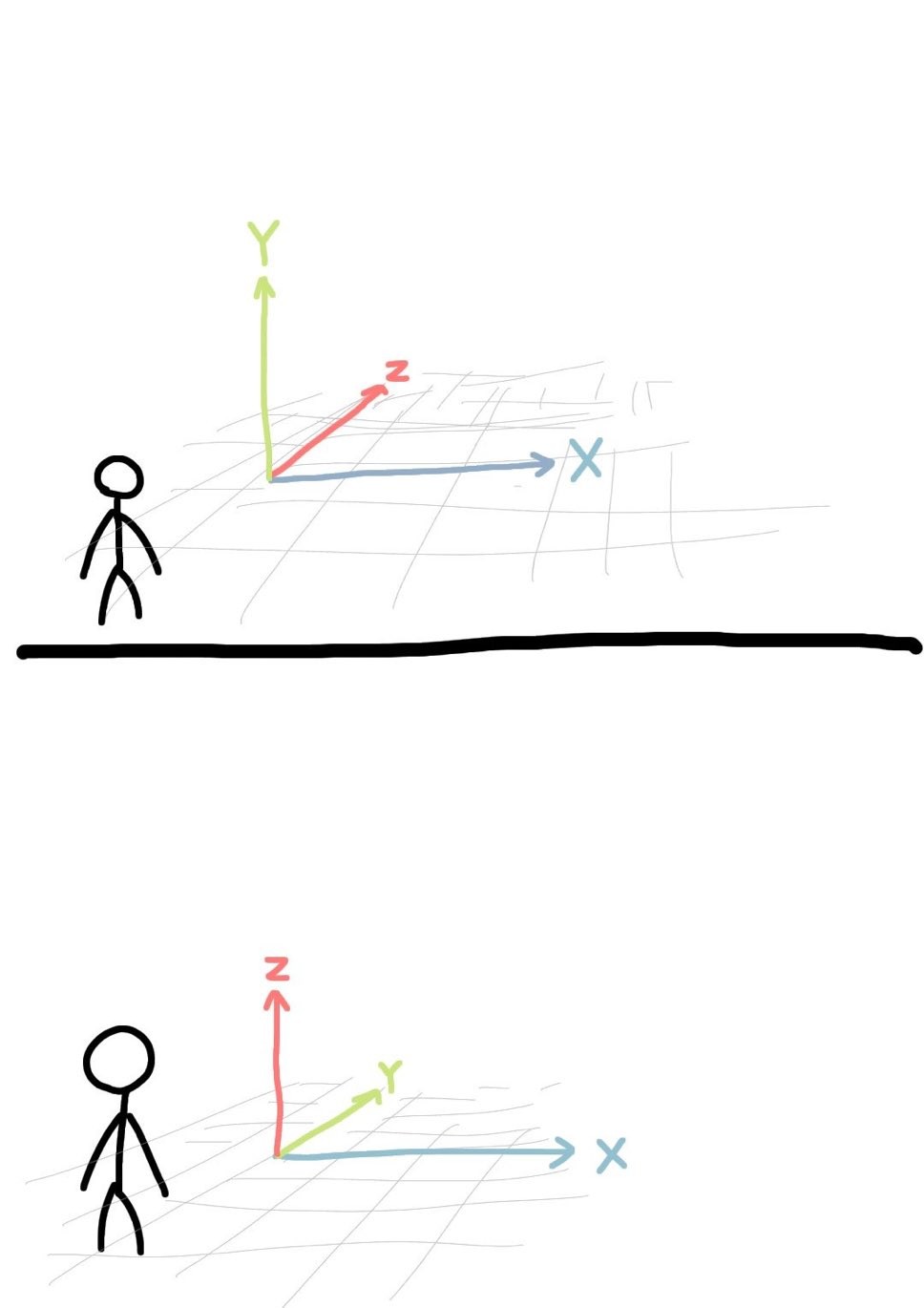
My son and I have had this very argument. I think the top one is right as he thinks it’s the bottom one. I have a coding background and he has a 3D printing background. I figure that’s why we’re different but I know nothing about 3D printing beyond the cool stuff I see on the Internet and things he’s printed for me.
I have been coding for over 20 years and the bottom one is more correct to me.
X and Y need to be on the same plane.
X and Y are on the same plane in both examples.
I have a looking-at-the-chalkboard-in-highschool background which I’m pretty sure defines my perspective(heh).
Reading this I realized both are correct, for coding the top one, for 3d printing the bottom one.
Somehow the whole thing makes more sense in 3d printing when you move in xy dimension during the layer and z between them.
That makes sense!
Probably because he uses Blender which invert Z and Y axes or maybe because it’s related to the nozzle POV
That makes sense!
I’ve never heard of Y pointing up. Z is always up. Unless you’re talking about lathes, where Z points to the right and X points up. Whoever came up with that, I hope his frying in hell.
I’ve never heard of Y pointing up.
Screen coordinates work like this because they are 2D. X for horizontal, Y for vertical.
Oh, you need to sort your 2D graphics to figure out how to handle overlaps? Z it is!
Working with robots at work x is horizontal y is depth z is vertical.
X across, Y to the sky, Z towards me
Everything else is wrong fight me
Z is elevation. Any real world application, z goes up down. 3D applications SHOULD use it for elevation. I despise that many do not. It’s so fucking confusing. 2D, sure y go brrr. But once that 3rd dimension is added, y needs to take several seats and quit trying to take on dimensions it doesn’t have any right to.
Y-up sorta makes sense in games. Imagine a 2D platformer, Y is up and X is horizontal. Now add depth. Instead of flipping axis just use Z for depth.
That’s the core of my point though. Once you add depth it’s not 2d space anymore (even though the screen is 2d, the represented field is 3D) and y becomes depth.
It all depends how you perceive the XY plane. Like if your job involves blueprints than XY plane lies flat and horizontal then it makes sense that Z axis is height. Hence why engineering software is all Z-Up. If the XY plane is upright, like screen coordinates, then Z is depth. Hence why many software that is used to create content for the screen is Y-Up. Like Maya, Houdini, Unity, OpenGL etc.
But in top down 2D games you also use X and Y but now neither is up
True but I think it’s also because of screen coordinates, Y is always the vertical axis in screen coordinates. So programmers translated that to 3D coordinates because in real world space the screen doesn’t lie flat but is up right. It’s probably why Y is up in OpenGL and calls the depth buffer the Z-Buffer.
It makes more sense if you’ve ever drawn in CAD. Top view, x and y. Now side view, y and z or y and x. You look down on x and y, and if you are extruding you now create the z axis dimensions. For the people who draft on the side axis: you are true psychos (ok, unless you’re using a lathe I suppose, or if the silhouette is more defined from the side… ok maybe not psycho, just odd)
User look sideways at item on shelf. Designers look down on paper. Both viewpoints are needed for it to be a good object.
Architects do both because they have all that math and something serious to prove.
I do use CAD software but always have my items resting on an x/y plane with z being height. I do some 3d printing and basic cad designs, so z being elevation still makes sense there.
You convinced me. Have an internet point.
Lol I was just ranting into the void but glad it resonated for you.
Unless you’re into magnetic resonance and use rotating frames:

Yeah… As a Blender 3D artist, Z axis has been baked into my brain as the up/down axis.
“baked” pun intended maybe?
Always bake.
I’ve been making models in Blender to import into Godot so I have to constantly switch.
I have experienced this. It was pretty confusing at first.
I am the latter, because if I draw a X-Y plane and lay it on the ground, it aligns with that XYZ reference frame.
Z is always depth. Both are correct but define different perspectives. Top is looking across the landscape from an arbitrary floating perspective, bottom is looking down with anchored mapping to the surface.
Smh I was fine with both. The upper one reminded me of the X Y axis we use to represent functions in maths. While the lower one represents altitude on a 3D map.
Invert y axis is the first option I tick in every game
Spent most my life working in a 3d environment… need to reverse that thing for a controller every single time
yep. in 2 dimensions, nobody really debates on whether x or y should point up, so i kinda think the debate about z stems from whether one thinks we should put the xy plane horizontally (like a sheet of paper on a desk), or vertically (like a chalkboard).
does any software default to making x be the vertical axis?
Good answer. Many posts are people saying “my approach is the right one, other people are irredeemable morons who should burn in hell”, but you’re right, it depends on your perspective.
If you think the top of the frame is correct, may I just say fuck you? Thank you have a nice day
So you hate everyone who uses Unity huh
But Z is depth… it makes the most sense.
deleted by creator
You’re still the bottom one, just looking at the z axis head on.
deleted by creator
The thing about web pages though is they’re primarily 2D, with height /depth as an extension. That stick figure is “standing” in the “flatland” xy plane in the top picture, and has no height or depth from my point of view, where Z is canonically height/depth.
It is all a matter of perspective.
No wonder Unreal Engine 5 is so slow. Its Z buffer is just a bunch of lines.
I have nothing against y pointing up, but I loathe the fact that left-handed coordinate systems are somehow considered an ok choice. This is probably the strongest I feel about something so inconsequential but I’ll die on that hill.
For me it’s the top one. In a web browser, when using CSS and JavaScript, x is the horizontal axis, y is the vertical axis, and z is for depth. Hence the
z-indexCSS property which determines depth.I would say the bottom one only makes sense if the stick figure were to hover in the air and look downwards. Then the z axis would be depth for him.
Can’t we fix this by using a,b,c coordinates? \s