This image was created by /u/kuebic@discuss.tchncs.de for this comment here: https://discuss.tchncs.de/comment/21735989. I had encouraged them to post it somewhere, but as far as I can tell, they never did.
Panel 1: “Installing Windows 20 years ago” screenshot of install wizard with just a couple buttons
Panel 2: “Installing Linux 20 years ago” screenshot of a busy command line
Panel 3: “Installing Windows today” screenshot of a busy command line
Panel 4: “Installing Linux today” screenshot of install wizard with just a couple buttons
This meme would be better if it were:
left column: 20 years ago
right column: todayBoth work because the reversal is part of the point. I didn’t find it difficult to read, so it’s subjectively legible.
3 out of 4 panels should be a picture where the operating system cant find the proper drivers
Which was the last version of Windows where that was an issue?
xp and 2k. first of all they were on nt achitecht, second the insrall disc had jackshit drivers due to cd size limits.
Real lmao
Now both sides meet in the middle: GUI for setup, terminal for fixing the one thing that breaks.
heyyy i’m the 900th upvote
Such a shame that Wayland did away with accessibility APIs which makes switching a hard stop for those of us with disabilities that rely on software that works with these APIs.
They work with X11, which had consistent APIs, but Wayland leaves it up to each distro to implement their own APIs, if they do at all, fragmenting the ecosystem.
Hell, even mouse acceleration curves are skuffed now, it really sucks.
X11 still works fine, despite the FUD.
Xfce4 is one option, several others exist.
@douglasg14b @SatyrSack distros do not implement APIs. I’m unsure what “consistent API” means in this context, but X11 is anything but consistent. And you can still just… Use X.org Server. What “X11 APIs” are you missing in specific?
I wasnt aware of this. Do they plan on adding some sort of API implementation like they are with other features or do you know?
Usually, the desktop environment devs come together and standardize on something. But yeah, someone has to drive that effort. Open-source isn’t really something you plan, you just need someone to push for it.
I installed my first linux using graphical installer over 25 years ago
Now do adding program to startup directory on atleast 5 windows modern version from xp to today to same with 5 different distros.
Also show the screen after attaching external HDD and trying to use it in ANY 5 softwares in windows xp and any 5 softwares on different Linux distros . Pathetically hard is word that comes wit mind.
too many variables. what are you hoping to show? what’s pathetically hard?
För first part, its pathetically hard to find the directory and more over out a program shortcut so that it can immediately start at computer start in Linux because the directory is not existent and there is no exe shortcut equivalent in Linux to out in that directory
Secondly if you connect an HDD , it’s instantly available to copy and to read FROM any and all apps in windows.this is very very hard in Linux , I connected externe HDD but I had do “mounting” to use it in media manager to even say save media here.
Apart from being trivial to these things in windows, there is some firing telling how to do it on their own distro usi g Terminal. I mean come on, who want to use terminal in 2026 as a regular user and for regular use.
Admit it Linux bros; Linux sux. Most celebrated- 4% market share for Linux os - is hardly any measure of usefulness and I doubt it will go beyond measly 5-7%. Until Linux stops , fix problems by Terminal, and be actually usefull.
find the directory
Many tools to help facilitate that.
locate,find(or easier syntaxfd),tree,ls,grep,lnand various shell builtins.exe shortcut equivalent
Perhaps you want to search
$PATHdirectories.There’s typically a reason things are the way they are, and not always legacy cruft no longer relevant. If something seems odd or inconvenient compared to what you’re used to, it may be because it has other advantages being that way.
För first part, its pathetically hard to find the directory and more over out a program shortcut so that it can immediately start at computer start in Linux because the directory is not existent and there is no exe shortcut equivalent in Linux to out in that directory
OUCH btw. That was really painful to read. XD
Also,
find the directory
Perhaps you want Gobo Linux, which has a different file tree arrangement perhaps more familiar and forgiving to those who’ve grown accustomed to how windows does things. (Almost certainly better off learning the more conventional ways though, even with how more unfamiliar as they may be to start with.)
Or perhaps you want the freedesktop XDG .desktop files directory? *shrug*
Or… just use the command line (or something like dmenu), if you know the name of the command you want to launch. It’s faster. … Or then eventually perhaps set up keybind shortcuts to launch things you want regularly and fast.
Or… o_O I suppose, if you really want… you could issue 1 command to make a directory of symlinks to all the executables in $PATH… something like
mkdir ~/exes ; find $(echo $PATH | tr ':' ' ') -maxdepth 1 -type f -executable -exec ln -s {} ~/exes/ \;(countless ways to do that… I just plucked the 2nd suggestion from an LLM, since the way I would have done it would have been using Fish… and that’s more bash/posix compliant, more universal.) But I’m not sure why you would want that. GNU+Linux is full of little programs, from the unix philosophy of “do one thing, well”, and it’d just be a lot of clutter in one dir, for what you can already access more cleanly and easily just from the command line and tab-completion (or even more completion advantages in ZSH and Fish).Also, if you’re not yet familiar with what tool does the job you seek to have done, you may strike lucky using the
aproposcommand to help you find which command does what you need done.Then of course all the various GUI tools to help you find things.
Secondly if you connect an HDD , it’s instantly available to copy and to read FROM any and all apps in windows.this is very very hard in Linux , I connected externe HDD but I had do “mounting” to use it in media manager to even say save media here.
Which distro and desktop environment have you tried this on? Many pre-install the things to make that “just work”. For some users, this is a feature that it does not do that. Learning how to use
mountandlsblock(andgrep) is handy, more awareness, control, fidelity, transferable skills, etc, than just having it do it for you and leaving you oblivious to what’s happening, to atrophy further from being able and eager to “give back”. Remember, it’s Free Software, largely made by users volunteering their contributions to improve the code… it’s good to learn.Apart from being trivial to these things in windows,
It’s also trivial in some distros with their preconfiguration, and in some desktop environments, and also trivial once you install/configure things in more barebones distro installs.
See, Linux is not just one thing. Can’t judge it all by one experience. It’s free software… it’s the freedom. It’s not “the one true way” imposed upon you. It’s good to explore this, and feel the neurons grow. ;)
there is some firing telling how to do it on their own distro usi g Terminal.
I struggle to parse that. “some firing telling”?
I mean come on, who want to use terminal in 2026 as a regular user and for regular use.
MANY people. It’s understandable, coming from windows, thinking that the terminal is some inferior ancient thing. It’s not like that on linux. Maybe if Bash is unappealing, try ZSH with Oh-My-ZSH, or even go straight to using Fish (Friendly interactive shell), for something even more convenient and humanable.
It may surprise, but often the terminal is faster than a GUI.
It’s also a universal interface. Text.
This makes documentation easier and more consistent. Where GUI instructions are a long series of click this and click that and so on, requiring the user to look for the things to click, and hoping they remain consistent (which they’re probably not), it can leave the user stuck. Whereas with text commands, you can copy and paste, and get the whole thing done in one. And can even investigate each of the parts to learn about it even more, further empowering the user.
I remember one of the coolest things to discover on my Linux honeymoon, was pipes. You can pipe commands together. This makes it tremendously powerful. It’s like language, able to form complex combinations of commands, like putting words together to form sentences, allowing the user the freedom to have the computer do what they want. Contrast that to a GUI which only allows the user to do what the programmer allows them to do.
https://www.youtube.com/@BreadOnPenguins is one example of a user showing off some of the power of the command line. :)
Some examples: https://www.youtube.com/watch?v=2A4bs40scSo ; https://www.youtube.com/watch?v=aNLGVFsQmsg ; https://www.youtube.com/watch?v=Z7GrT2jOy4Q ; https://www.youtube.com/watch?v=duKXvHa1HMs ; https://www.youtube.com/watch?v=g5BoVPhewWM ; https://www.youtube.com/watch?v=x22k3csfJCo ; https://www.youtube.com/watch?v=uCqOgWR0g2o ; https://www.youtube.com/watch?v=lyd6Lxy1IuE ; and on and on it goes.
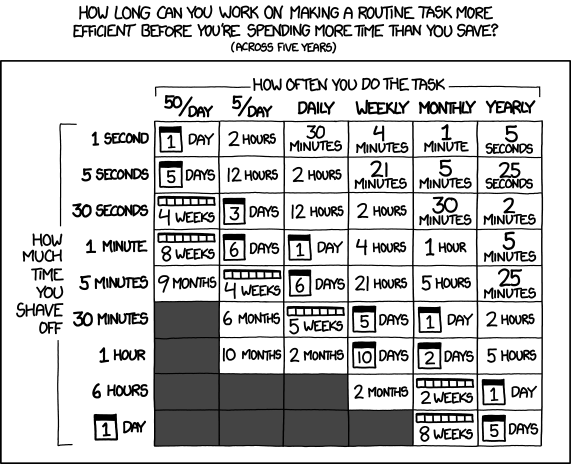
https://xkcd.com/1205/ … It’s worth the time:
Admit it Linux bros; Linux sux.
n_n Amusingly, “Linux sucks” has been the title of a recurring series of articles/videos from at least a couple free software advocates/journalists. n_n It’s not about that though is it, true or not… It’s the freedom. Quality of software/experience is a secondary concern. Sure, it may be true that the freedom allows better software to be made, but that’s not a guarantee, and we can’t get there without the freedom. https://www.gnu.org/philosophy/ is worth exploring.
Most celebrated- 4% market share for Linux os
Are we doing argumentum-populum there? The merits lay elsewhere. I wonder what % use Ironclad has… maybe 0.000,000,001%? But it’s still of merit. And how many users when Richard Stallman started the GNU Project, or how many users when Torvalds started the Linux kernel… See? Not really a worthwhile measure is it.
- is hardly any measure of usefulness and I doubt it will go beyond measly 5-7%.
But if you insist… Check out how much a % share for servers. ;) ;p
And, it does look like it wont top out at around 7%. The trajectory has been increasing in recent years, such that it’s near doubled… I’d be interested to hear what you base your doubt upon. Some (weak) measures suggest it’s already passed 6%.
(Tried to find a server specific image I’d seen (I think) on Lemmy, but failed to find it… but found this one instead…)

Until Linux stops , fix problems by Terminal, and be actually usefull.
?
If Linux stops (as in the kernel development ceases (~ which seems wildly implausible)), there are still the BSDs, Solaris derivatives, Ironclad, Hurd, and other kernels, and dozens of completely other operating systems not even in the UNIX paradigm, like AROS and Kolibrios and TempleOS and Plan9, and on and on, and plenty enthusiasts who may yet start other projects entirely new, or rekindle the likes of IRIX with a free software license. Linux is just a kernel that slots into the GNU system (or non-GNU, or Android, or embeded, or others).
Most important take-away from this long reply:
Even in 2026, the command line’s advantages over GUI are still strong and persisting and growing in usefulness more than GUI. The terminal is not inferior, and that’s why it is not going away. It’s very well worth the time invested in learning.
… I’ve saved so much time, I had the time free to leisurely write this long reply. ;)
…
Oh, and PS: as for your original challenge, to which I said there are too many variables… most things that need to be on startup, will be added to startup, by the package manager, when you install it… so… that’s easier. Then, so many ways to do it after that, be it via your init system (copy-pasta a pre-existing startup script in /etc/init.d for sysvinit, or service file in /etc/systemd/service for systemd, or script in /etc/sv for runit, etc., and edit the program name, and run the couple init system specific commands to enable it, which in runit’s case, is just a
chmodandln -s… all of which can be scripted up for even greater convenience over control), or just add it to your bash profile, or to your GUI autostart, or set it up in a startup cron, or, other ways… Nice to have that much choice and control over your software. :D “Either the user controls the software, or the software controls the user.” :)
The installing Windows 20 years ago panel is missing the bit where you have to push F6 and have a floppy disk handy with the drivers for your storage device. Yes, an actual floppy disk. Ditto for all the other drivers (video, sound, network, etc.) that you usually had to install once you were booted into the OS.
A realistic memory (set to music) of Windows technologies
May I remind you that 20 years ago was actually 2005? What you are referring to was more like 30 years ago.
20 years ago you needed to search the web and download all the drivers AFTER the windows install then install all of those.
I don’t miss that time. Especially on laptops that weren’t supported by the manufacturer and you had to hunt for individual drivers.
Today that only happens if you run Linux and have an Nvidia card. Especially one that’s not supported by the newest driver version anymore.
30 years ago, Windows 95/98 (not sure about things like NT4) would just fall back to going through the BIOS to access the disk. It was slow, but it worked, and you could install Windows and then install your storage drivers later. Needing to push F6 and install your storage drivers during the install was a Windows 2000/XP thing.
I skipped 2000, but I installed XP a lot of times and I never had to insert a floppy. IDE and SATA drivers were preloaded, maybe you had some really weird storage system?
It was probably a combination of using the motherboard RAID and AMD motherboards to boot.
Microsoft also updated their Windows XP install disk a few times over the years. If you were installing from an original launch disk from 2001 on a PC with 2006 hardware it was quite a different experience than with a disk that already had SP3 and a bunch of newer drivers.
Yeah, that’s rather obscure hardware. I can imagine that you need some drivers for that.
Btw, while this dialog asked for a floppy, it actually used the regular file system, so a CD or even an USB drive worked as well.
I think with cheaper consumer desktops using IDE hard drives, that worked out of the box, but some more exotic storage configurations (SCSI, anything to do with RAID) were a little bit harder to get going.
Isn’t that a bit more than 20 years ago?
Getting help with Linux 15-20 years ago: some forum full with slurs telling you to google it
Getting help with Windows 15-20 years ago: “Do this and this, if that fails look up data backup methods before the reinstall.”
Getting help with Linux now: various Wikis and blogs. The hazard of finding an AI hallucinated blog post is significant, but can be blocked.
Getting help with Windows now: support forums owned by Microsoft filled with users telling they have the same issue, and AI agents hallucinating solutions.
Getting help with Windows now: support forums owned by Microsoft filled with users telling they have the same issue, and AI agents hallucinating solutions.
I feel this to my core.
My work PC uses Windows, and sometimes I have to Google something that is acting up, which takes me to these sorts of threads. It’s always:
OP: I’m having trouble with this app, it doesn’t recognize my default audio device. I’ve tried X, Y, and Z, which did not work.
Jimothy, Certified Windows Expert: Greetings, OP! My name is Jimothy, a Certified Windows Expert and fellow Windows enthusiast! I am sorry to hear about the issues you’ve been having. But don’t worry, I am here to assist. 3 paragraphs later You should try going to the user settings and make sure that “Use default audio device” is checked on. Did this fix your issue?
OP: I don’t see any setting labeled “Use default audio device.”
15 posts follow from other users who are experiencing the same issue, also confirming there is no such setting.
Jimothy, Certified Windows Expert: Greetings again, OP! I am sorry to hear that did not answer your question. According to the app specifications, use of the default audio device is not a supported feature at this time. If you would like to make a suggestion to include this feature in a future release, you may submit a request through the Microsoft Feedback Portal. I will now close this topic to further replies. Thank you!
lol, freaking nailed it. God those are insufferable.
Getting help with Linux 15-20 years ago: some forum full with slurs telling you to google it
No it wasn’t, where we you going for help lol?
On the forums asking for help.
What forums? In 2005 every forum I went to was really helpful, friendly, and nothing like what you describe.
Certainly there was a little bit of internet snarkiness I would imagine, but I remember everyone being pretty nice to each other.
I decided to go back and look using the way back machine and went through a few threads, everyone is being really nice and helpful to each other.
Same experience.
Huge part of what kept me in the community of the Free Software philosophy.
It’s in the 4 freedoms. Free to use, study, share and change, the software. That’s the enabled and protected spirit of helping each other.
Assertions of contrary, has me wonder what those offering those other assertions were doing to get that kind of reception and impression.
Asking for Linux help online is still just as toxic and useless as 20 years ago.
Being told “RFTM! noob”, isn’t as common as it was 20 years ago. At least with Fedora where good help can be found. Still, there are a good number of questions that just don’t get answered either.
Try Reddit or Stackoverflow for a contrasting experience.
I often go through r/fedora and I very seldom come across anyone belittling anyone else. You might not get an answer at all, but it’s seldom anyone will tell you to RTFM. I have little experience with stackoverflow, so I can’t say anything about them.
Being told to read the manual did me good.
We should bring back RTFM, and cease allowing it to be smeared as something bad. Burnout is no fun. RTFM spares developers from burnout, allowing them to continue developing good software (and have it be well documented… if only users would read the flippin manual!) ;D
RTFM is good and can be useful for newcomers, if you help them through finding and understanding the RTFM. Many of them are poorly organized and written. It can be hard to understand them.
All the support forums I went to (redhat, gentoo, debian) in 2005 were friendly helpful and well moderated. What is this fud?
to be fair, some linux forums still have toxic members, and some others while probably not toxic, are still a bit harsh with people
Unless you’re installing some weird corporate build of Windows you’ll have a very simple installation process. Linux has caught up a lot to that experience.
linux has had easy gui installers since the 90s. what do you mean linux has caught up a lot?
Might be more a question for OP. 20 years ago was 2005, so I suppose they’re the ones making that claim.
You also had to spend hours tweaking your install in any Linux distro. Now most work out of the box.
Windows on the other hand…
But they don’t work the way I like so I still have to spend hours tweaking them.
But once you got that XFree86 config dialed in, life was awesome.
(Ok looks like Xorg has been around for 21 years, so maybe you were running it instead.)
“had to”?
got to.
Also not Linux dependent, I’m sure windows users spend hours tweaking their installs to how they want it.
Not as much as we have to now.
I’m usually a Windows shield-bearer around these parts, because it’s not quite as much of a dumpster fire as people say (please for the love of god don’t debate me on this, I prefer Linux and have better things to do), but this is inarguably something Windows has gotten far far worse at. Out of the box experience (besides having to shove drivers into the install media) used to be a pretty definitive thing that Windows beat Linux on. Install and it “just werkd”. It used to be the cornerstone of pushback, that Linux required you to tinker and Windows didn’t. But Microsoft destroyed their lead in that so they only have (fast dwindling) business appeal and entrenchment to lean on now.
not quite as much of a dumpster fire as people say
Yeah. It’s not the dumpster on fire. This is fine.
Out of the box experience (besides having to shove drivers into the install media) used to be a pretty definitive thing that Windows beat Linux on. Install and it “just werkd”. It used to be the cornerstone of pushback, that Linux required you to tinker and Windows didn’t.
When I switched to Linux in late 2003, with SuSe, iirc everything just worked, out of the box, and I ran it vanilla for a couple years. Didn’t even need to install an image manipulation program, or an office suite, or a second web browser, or many other things, because it all came already installed. When did windows ever have a sound argument for “the cornerstone of pushback” claiming to be superior for “just werkd”? The early 90s? I doubt even then. Seems from my experience like it was more likely always advertising FUD.
20 years ago it was way easier to install Linux from a boot disk (like ubuntu or suse) than windows from scratch. Sometimes XP didn’t have the necessary drives and you’d need to find bootable drivers and load them from a floppy disk
It was even easier to install OSx86 on my laptop than windows vista from scratch in 2007
Maybe this is one of those thinking that 20 years ago was the 90s
I remember reformatting a Windows computer to get a fresh install and I had to find the driver CD and install a driver for audio, internet and other very basic stuff.
I guess you’re right in the sense that neither could play audio off drivers packaged with install media in that era.
Well that screenshot was accurate for Gentoo circa 2005, it’s just the worst choice for ease of install, with Linux graphical installs provided by suse, mandrake, and redhat from the 90s.
Fair point could be made that the out of box experience was sorely lacking and you pretty much had to configure;make install most software you actually wanted…
2005… could have had Sabayon Linux. Easy way to install gentoo with a gui installer. So even then. [Initial release 28 November 2005]. Maybe even other convenient gentoo respins before that.
Yeah in 2005 every major distro had a decent clean gui installer. I recall at the time using fedora. Then Ubuntu a few years later.
But god help you if you needed wifi drivers.
Even in the 90s Redhat had a decent installer.
Urgh, we downgraded from Gentoo to Ubuntu.
I am new to linux Mint and mullvad had an update ready, so i clicked update. It just stayed downloading on 0% for like 5 minutes, so i remembered this ISN’T WINDOWS. So i opened terminal and sudo apt upgrade and Mullvad was updated and new version installed.
It’s weird how windows makes things looks easy, but then they don’t work well. Linux makes things look difficult, but it they work well.
Not exactly. The GUI variant of the updater that you tried also didn’t work well.
CLI mostly works ok (unless a bug causes your DE to be uninstalled if you try to install steam), but GUI is very hit-and-miss.
Just the other day I had a bug in XFCE where I want to scale up the contents of the screen. So I use the GUI display config tool, set the scale to 0.5 (because for some reason they scale the wrong way round, <1 enlarges, >2 makes things smaller). It does work, the display gets scaled up.
After I’m done I want to scale back down and the GUI display config tool just locks up on startup and only shows a blank window with a few blank dropdowns.
A bit of googleing later I found the config file where I can change it back and once I changed the scaling to 1 again, the GUI tool worked again.
I’ve been using Linux exclusively for many years now, but without google I couldn’t have fixed that.
to be fair if it had an update button, that should have been enough for it. you don’t need to run commands because this is the Linux Way, but because better solutions are not there yet
I mean,
aptitudeand Synaptic update packages or the whole system fine. It’s just that Mullvad has no business trying to do that itself.apt and synaptic is not really user friendly though. but something based on packagekit can show a better program ctalog, and even provide automatic updates, or even just reminders that there are new updates.
Ugh. That reminds me of the Microsoft admin fanboys where I worked, dissing Linux because its all command lines, while saying that MS inventing PowerShell was a stroke of genius making their lives easier.
I had a coworker, about 30 years old… Who taught computer science at a college prior to us working together… Who said to me “Command line? That stuffs ancient, man.”
Just in case you were thinking about spending money on college tuition to learn computer science…
CAN CONFIRM LMAOOOO
Don’t pay back your loans, it’s all a scam hahaha
Meanwhile in Finland my first exposure to a Unix shell was in an introductory IT course in uni, and that inspired me to switch to Linux four years ago. Without all of that I would have never got my current internship where 90% of my work is in the terminal.
Tell him a wrist brace helps with mouse-induced RSI when it flares up.
If an ancedote has someone questioning if they should go to college for computer science, they should definitely not be going to college for any degree.
No, they definitely should.