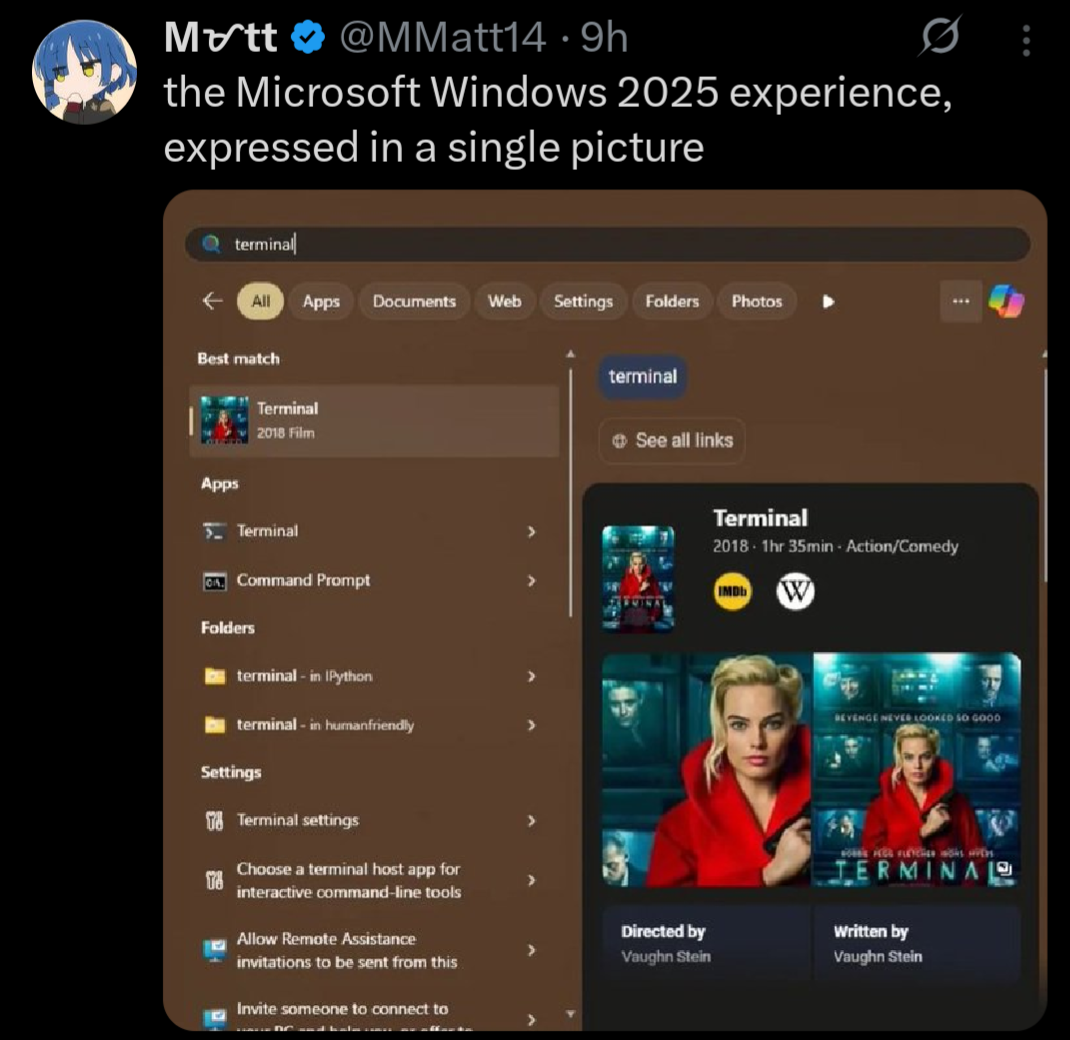
I remember how the startmenu didnt suck on windows 7 and just worked. Good times. That was also the last time where you could find most of the options in one place.
Like in 2015 i was weirded out how a multibillion dollar company wasnt able to just make a new app for settings with feature parity to the old thing for their major new OS release. 10 years later: lmao.
Even the windows 10 startmenu didn’t suck if you took the time to customize it - The Metro tiles were nice, with grouping and folders making everything pretty neat and reducing the need for the standard program list to a minimum; I made mine 3 columns wide, which made pretty much every app i regularly needed available on the fly, using horizontal space that’s much more available than vertical one.
I just use OpenShell to make all of my Windows 10 machines’ Start menus into Windows 7 start menus hahaha. It even fixes search!
I haven’t any windows machines left (at least physical), and i’m pretty comfortable with KDE Plasma, although i’m sure i could make my start menu nicer. Damn, now i have to look into it lol
I managed to squeeze another year of updates from Windows 10 we’ll see how things go…
Switched to 11 to keep up with our employees updating their laptops. It’s been completely pain free. I managed 130 laptops at my last job, no problems. No idea how people are getting crap such as pictured.
Lol
this has been a thing since early 2024.
If you choose to turn on Personalized offers, we will use information about your device and how you use it, including Windows diagnostic data, in combination with your account info and data collected by other Microsoft products and services to offer you personalized tips, ads, and recommendations to enhance your Windows experiences. Personalized offers include suggestions on how to customize and optimize Windows, as well as ads and recommendations for Microsoft and third-party products and services, features, apps, and hardware to enhance your Windows experiences. For example, Windows might tell you about new features to help you get the most out of your device. If you stream movies in your browser, Windows might recommend an app from the Microsoft Store that streams more efficiently. Or, if you are running out of space on your hard drive, Windows might recommend you try OneDrive or purchase hardware to add more storage.
Thankfully, there are easy to access and use tools to completely rid yourself of the bullshit, ads, and telemetry within Windows.

But does it revert after an update
Might as well link a few:
However, do note the massive caveat of these tools is that they are proprietary, closed-source tools that must be run with administrative access to your PC, and I have yet to find a satisfactory open-source alternative.
If it works, it works, but I do question the security implications of allowing these tools that level of unfettered access to your system. If possible, I highly recommend giving Linux Mint a try, rather than relying on sketchy tools to debloat a sketchy OS.
I’ve been using Chris Titus’s WinUtil : https://github.com/ChrisTitusTech/winutil
I have no idea if it is open source or not, I’m not really sure how to check that. I’m pretty sure that his utility includes shutup10 within it. Regardless, yeah, I should have linked it. Thanks for the reminder. It’s been a fantastic utility and I’ve been very happy with it. Between that and WinAeroTweaker, I have my system set up pretty much precisely how I want it.
I am so close to jumping on the Linux train though. Not for any usability reasons within Windows, as I said, my install is pretty much perfect for my needs at this point. More of a moral stand against a company which I vehemently disagree with their stance and actions in the world. The only problem I keep coming back to is that 1 or 2 of my games won’t work on Linux due to anti-cheat bs. That’s pretty much my only sticking point now.
Mine too:

FYI, you don’t have to use any third party tools and I didn’t, either. Step 1 is to run the Enterprise LTSC IoT version of Windows (either 10 or 11). The consumer versions of Windows are extra bullshit, as we all know by now.
Remove the Windows Store via Powershell (you probably have to run as an administrator):
Get-AppxPackage -allusers *WindowsStore* | Remove-AppxpackageThat removes the store suggestions. It also removes the store entirely, as well as the ability to install store apps. Obviously don’t do this if you are one of the 0.1% of users who actually use the Windows Store for some twisted reason.
Then in gpedit.msc / Group Policy Editor:
Local Computer Policy \ Computer Configuration \ Administrative Templates \ Windows Components \ Search
- Allow Cloud Search → Disabled
- Allow Cortana → Disalbed
- Allow Search Highlights → Disabled
- Do Not Allow Web Search → Enabled (gets rid of the internet search)
- Don’t search the web or display web results in search → Enabled (probably overridden by the above, I set it anyway)
Local Computer Policy \ User Configuration \ Administrative Templates \ Start Menu And Taskbar
- Remove Personalized Website Recommendations From The Start Menu → Enabled
- Do Not Search Internet → Enabled
There are settings for other nags and irritations in here that you may also want to configure to your tastes as well.
Also:
Local Computer Policy \ User Configuration \ Administrative Templates \ Windows Components \ Windows Copilot
- Turn off Windows Copilot → Enabled
This is great advice, but I think we can all agree it absolutely shouldn’t be necessary. All this ad bullshit, store suggestions, Cortana, Copilot, web search, etc. should be opt in, or not exist at all.
They can do whatever they want, it’ll be without me.
I’m not saying that my Linux installation was super easy to set up, but once set up, I’ve had fewer problems than Windows.
I for one do miss my system restarting in the middle of some work to apply an update.
You can do that in Linux too! Just put an entry in crontab to reboot the system sometime during your working hours.
I just installed Linux the other week and it WAS super easy to set up for me. I was really surprised but everything just worked
The hardest part was getting my Windows-only games to play properly in Linux. Rocket League was relatively easy, but Skyrim was a real pain to get working. But now that Skyrim is working, it strangely feels either the same or slightly better than it does in Windows.
Easier than installing and setting up Windows in my experience
That’s been my experience too. I’ve been pleasantly surprised by how easy it is to game on Linux. There have been some games where I had some issues, but the same could be said for Windows too. I think the gaming specific aspect is roughly equal between the two operating systems.
The nice thing about Linux though is that when it does go wrong, I am better equipped with the information and tools to be able to effectively troubleshoot and fix the problem. At least, in theory — I am still learning, so I often find myself wading through logs that I don’t understand, with little progress. It does at least feel more empowering though, to have the abstract option of being able to fix my problem, even if I am not able to grasp that opportunity in practice.
Unrelated to that exact image but I’m gonna rant about other windows shit because I feel like it.
Windows decided my page file needed to be 80 GB. I do not want it to be 90 GB. I go to the start menu and search up “page file” to see if there’s a settings menu. First result is a random file in an application’s directory that can’t be opened/displayed by any program on my PC, then a list of other unrelated files.
So I open Control Panel, hoping to find it where I did before, and I click on
System. What do you know, that menu no longer exists, and redirects to Windows Settings. Where do I go from here? Maybe the giantInstalled RAMsection because the page file is just a (overly simplified) method of extending your memory to your disk? No, of course not, that menu’s not actually a menu, it’s just a stat counter.Instead, I have to go to Device Specifications, then the section titled
Related links, then clickAdvanced system settings. Oh whaddaya know? Now I’m in the settings menu that used to be behind the originalSystemoption in Control Panel!Now I’m in the Advanced tab of that menu. But where do I go from here? That’s right,
Performance Options, and then anotherAdvancedtab!!!Then I have to click the
Changebutton, where Windows has… conveniently enabledSystem managed sizeso it could choose to set my page file to 80 GB.I edit, it, hit
Ok, have to hitApplyin the other menu too, have to close out the no-longer-needed Settings and Control Panel windows that only served as a maze to get me here in the first place, and THEN I can restart my computer to reduce the size of the page file, even though it is currently not in use by any program, and all data is in RAM, and the file could reasonably be shrunk by the system at any time.After the restart, this process begins all over again, because this is my third attempt, and Windows automatically reverts back to managing the size itself, and sets it to 80 GB. I have 5 GB of storage space left on my disk.
Would you recommend MS make it easy for idiots to fuck with the page file?
Yes?
If my page file is set to 80 GB by default but isn’t being used by applications because my actual RAM utilization is always under 80%, and they have a dedicated settings menu for it, you’d think they could make getting to that settings menu not take a minimum of 8 separate clicks (assuming you have memorized exactly where to go from the start, and never click the wrong button or link), 4 separate menus, 2 nested “Advanced” menus, and multiple fields and checkboxes to tick off and edit after all of that, just to say “Use less of my disk for the page file”. This could literally be a slider in Settings.
The page file doesn’t cause major system instability if you adjust its size, unless you’re constantly using much more RAM than your system has, and the page file is manually set extremely small.
It just helps keep your system more stable by offloading excess data that can’t be stored in RAM to your disk. My entire computer, even under heavy load, never needs more then 2-5 GB of space on top of my RAM, and that’s when I’m running games at max settings, my browser with 40 tabs open, and multiple instances of 3D design software in the background, hardly a common enough occurrence for Windows to justify going “eh, maybe they’ll actually need 80 GB, you never know”, and never letting me change it even after I restart.
Swap is also used to offload data in RAM that’s used infrequently to instead prioritise caching data that doesn’t need to be in RAM but is nevertheless used more frequently.
If you’re playing Dark Souls and have a web browser open in the background, each time you die the game may need to re-load some level data or assets from disk (e.g. they relate to the area you respawn in, but not where you keep dying). If the computer can instead keep those in RAM, you can respawn faster. If it has to put Chrome on disk that may be a worthwhile tradeoff.
at this point arch linux is more user-friendly
As I say, when you’re hunting around for something in Windows and you come across a dialog box that came straight from Windows XP… you’re getting close.
All this yes. If you’re actually looking for help, you have to also click “set” after changing the page file settings.
Had to go through this the other day. At the third consecutive “advanced settings” menu I wondered if this was some kind of sick joke
I empathize with this slightly non-ideal situation.
But can you imagine how insane it would be if you were told to do something like copy/paste
swapoff /swap && truncate -s 8G /swap && swapon /swapinto a terminal? TEXT? Like a caveman? The horror! The heresy! How can anyone be expected to do something so complicated! This is entirely unreasonable UX and the reason why Linux is straight up unusable.Btw here’s 15 bazillion commands in a
.psto perhaps disable some of the ads in your start menu until the next time your computer reboots.I agree with the sentiment, and it would definitely make a lot of troubleshooting easier, but you do gotta remember that 99% of people are so non-technical they won’t read anything going into their terminal, or if they do, they won’t know what it means.
You could just as easily replace that with
sudo rm -rf /*and they’d run it just as quickly, and that’s my worry.IMO we should just have settings menus alongside commands for most things any normal user might have to encounter, since that’s just a more user-friendly interface in terms of preventing accidental bad command execution and also just letting people find things on their own without having to look up a command every time if they don’t want to learn a short book’s worth of terminal commands.
IMO we should just have settings menus alongside commands for most things
So like KDE
IMO we should just have settings menus alongside commands for most things
There, are - PowerShell.
Changing the size:
$pagefileset = Get-WmiObject Win32_pagefilesetting
$pagefileset.InitialSize = 1024
$pagefileset.MaximumSize = 2048
$pagefileset.Put() | Out-Null
Disabling automatic sizing:
$pagefile = Get-WmiObject Win32_ComputerSystem -EnableAllPrivileges $pagefile.AutomaticManagedPagefile = $false $pagefile.put() | Out-NullThe kind of person who blindly runs commands also blindly runs any .exe or .bat they download from github which is not any better.
Of course in an ideal world there’d be a perfect GUI for everything, and we’ve gotten a lot better at that in the last few years. But it’s not like windows is lacking in things that are only configurable through CLI or the registry (which is even more opaque). I’m not saying Linux is perfect, just pointing out the hypocrisy.
IMO we should just have settings menus alongside commands for most things any normal user might have to encounter, since that’s just a more user-friendly interface in terms of preventing accidental bad command execution and also just letting people find things on their own without having to look up a command every time if they don’t want to learn a short book’s worth of terminal commands.
THIS. As a lifelong Windows user I’d rather deal with layers of shitty GUI, than having to memorise terminal commands and always pay attention not to mistype them lest I fuck my system up.
I can’t switch to Linux yet due to lack of support from my essential programs, but even if it wasn’t for those, I’d still be annoyed if I had to use a terminal to change settings in my system.
Love how this is what the world’s talented and well paid humans are making.
Talented in what
to be fair, the talent and paygrade doesn’t matter if the management is ass. Modern dey corpos are a disaster in that regard
I can’t believe the stuff windows users put up with.
Eh, people put up with much worse shit than this in the grand scheme of things.
they shouldn’t have to though. windows didn’t used to be like this. it’s sad to see the way it’s been enshittified.
It all makes so much more sense when you accept the fact that the vast majority of the population doesn’t know what the Windows Terminal is, but instead can tell you every detail about Taylor Swift’s engagement.
Sorry for your loss. Linux is there for you though.
Windows users likely disabled that shit when they first installed the OS and never looked back.
Much the same as Linux users tweak the OS to their tastes.
Searches the internet
Gets internet search results
“Yo what the fuck”
I think the complaint is that the start menu searches the Internet at all in the first place.
Step 1: Explicitly search not in browser but in menu designed to navigate your system Step 2: Hit enter to open first option because you just want to get there quickly Step 3: Automatically opens the browser you don’t want to use to search for “family photos 2025” because it decided that was more important than opening the folder you made yesterday with all the family photos, aptly named “family photos 2025”. Step 4: Generate returns for Microsoft’s shareholders when they say Bing search volume went up.
No, this is blatantly false.
Searches start menu Gets sponsored internet results Yo, what the fuck.
If anyone wants a fix for this, yes I know Windows sucks etc, I have to use it for my job:
Press Win + R, type gpedit.msc, and hit Enter.
Navigate to Computer Configuration > Administrative Templates > Windows Components > Search.
Double-click Do not allow web search and set it to Enabled.
Double-click Don’t search the web or display web results in Search and set it to Enabled.
Click Apply and OK.
If this comment was suggesting a Linux command to fix an issue on Reddit, rather than Windows aerobics on Lemmy, it’d have a thousand comments about how Linux is not ready for end users because nobody wants to browse obscure options to fix usability problems.
But we all know that Windows isn’t ready for end users…
They still didn’t open a command line
True. They opened a dialogue box that uses a 2007 UI, changed one specific obscure policy, “enabled” the policy to “disable” the feature (how intuitive!) and are now praying it doesn’t reset after a system update. All of that to be able to use search, a feature computers had mastered in 2002. Let’s also hope Group Policy Editor is enabled on their version of Windows.
How user friendly! So lucky he didn’t have to use a command line interface!
Win + r and running gpedit.exe is simply a terminal command with extra steps.
… Until the next update enables it again
that sort of thing on my work computer pissed me off so much that I finally swapped to Linux on two of my computers at home
lol yeah, but to be fair group policy usually doesn’t reset… Until it does. If it were a managed device the domain controller or MDM (Intune) would be resetting it every time you log in so it would stay off but with local group policy you don’t have that kind of guarantee. Strangely to me Intune doesn’t use grop policy and instead uses a separate configuration API that it calls “Configuration Service Providers” that can lock these settings too.
One of the reasons I run linux at home is that I don’t need to do this for my own computer that has been pretty stable on Debian with XFCE going on 20 years (different hardware too, just migrated home).
Why do people still suggest using Group Policy for this?
It’s complicated for the average user, it’s non-existent for the vast majority (Windows Home doesn’t give access to
gpedit.msc).Just go Search -> Settings -> turn off Web Search, like a normal person. Job done.
In many if not most cases, you can just add the registry entry for the setting, even in home versions, though to your point, it’s harder than it needs to be.
Really, it shouldn’t be an issue in the first place, but here we are.
That can get reverted when windows updates, the group policy doesn’t
No one on Lemmy should be running Windows Home lol
Windows: where you enable to disable.
Win+R, wt, Enter
OR
Win-X, I
The start menu has sucked for a long time, but you don’t have to use it. I cringe when I see other IT folks using its search feature to launch common apps.
At least they are improving the app list with a nice category view and removing the All Apps button (still in preview). That’ll at least upgrade it from hot garbage to okayish.
You cringe, when you see other IT folks use it, but it’s literally what it was built for and how it works on Linux to this day. (And even in a well managed corporate environment it works 80+% of the time)
And it’s not like what you wrote works for any other application.
Funnily enough I started using the Win+Shift+Ctrl+Alt-shortcuts for OneNote, Excel and Word unironically as of late, because the start menu got sooo slow.
Modern start menu search was designed to drive users toward Bing and give MS-favored results to users. It’s hot garbage and has been for a while. So yeah, if you rely on as an IT pro it you probably aren’t very technical.
You can launch any common inbox or Office app and most MMC panels from the Win-R menu. And most of them haven’t changed since Windows 2000 / Office 95. Not being able to adapt and improve upon how you perform your job is sad.
then you probably aren’t very technical.
Lol.
Right?! I love the people giving ‘help’ on how to launch the terminal in other ways, lol, but, this was the worst of them.
This isn’t OOP saying “OMG! For terminal specifically, Windows is making it so difficult for me! Please, someone, show me another way to get to the terminal! Bonus points if you can be a jerk while doing so!” It’s them saying “Windows start menu search is fucking broke as hell and here is an example”
Saying that people are ‘cringe’ for expecting the search to work isn’t helpful at all (people giving tips on other ways to get to programs though, yeah, that can be helpful to try and help others work around MS breaking basic functionality). This is functionality that has been in Windows since Windows 7 and has been in every OS with a GUI that I’ve used for a really long time … expecting it to work isn’t absurd in the least.
Can’t we all just join together in our disappointment/hatred of the Start Menu Search functionality and the enshittification of the OS in general rather than having to try and make it into a “I’m so much better than you because I do this in a power user way”? Especially when that power user way isn’t even useful for a lot of applications!
It’s been broken and slow as hell since Vista. So yes, when IT “professionals” haven’t figured out other ways to run common programs by now, it hints at how remedial their skills are.
I get more frustrated at how many people, especially IT folks, don’t get that these anti-features are configurable.
5 minutes (at most) in regedit and/or Group Policy to disable this bullshit entirely? No, let’s add a three second mental hitch where I have to recall the magic key combo every time I want to open the program. And still leave the problem in place for everything else.
Used an ancient tool i found on github 5-6 years ago to disable Windows updates called WUmgr, still using Windows 10 and last update was sometime in July, the program works as intended, have no plans to update to last version of windows because this one works just fine and will keep using it until i finally switch to Linux.
I took this approach at windows 7’s end of life. Eventually you will notice little things breaking, then there will be a watershed moment that will drive you to linux very suddenly, so be ready for that. In my case, it was Steam and Firefox completely breaking simultaneously.
Honestly there’s not much that’s holding me back from switching to Linux, i don’t play that many online games, just Warframe at the moment which is kinda disappointing because it’s mostly f2p and they still don’t have Linux support and i mostly just play it on and off lately because 7 years is a long time to play 1 game, i mostly enjoy offline games and most should work on Linux, the only one that is worrying is S.T.A.L.K.E.R. G.A.M.M.A. and it could run better on Linux but i’m too lazy at the moment to switch to Linux completely, i do have 2 laptops and 1 old PC running Linux Mint and it’s a surprisingly smooth transition, so yeah probably going to delay it till stuff starts breaking then switch and be like “i should have done it sooner”.
Looks like Warframe works just fine on Linux: https://www.protondb.com/app/230410
as a linux user (so, genetically superior in every way) i do not have this issue. hahaha…ah.
… sudo app install … a friend?
You forgot to mention that you use Arch BTW.
flatpak install companion.app 🥲
As a Windows user - same. I have no clue where people are getting these screenshots from, I haven’t seen anything like that, ever. Maybe a regional thing, I’m in the EU.
The Windows start menu is completely useless now. I know they pushed using the search to find apps, but I never used it that way except as a last resort.
I’ve been on Mint for just over a year, now. I’ll never go back.
By find apps, do you mean the ones I installed already or ones in their marketplace or whatever?
Because I’ve never been able to have it find my own god damn programs that I installed locally and fully given up on ever using the start menu.
How does it not work? My Win11 start menu is flawless, start typing receive app, no ads.
Try running MMC…
I despise that it defaults to a web search if it can’t find what I’m looking for, which is most often a very real setting that I know exists…