I am a Linux beginner/amateur and I have sort of had enough of copy and pasting commands I find on the internet without having a good understanding of how they actually work.
I guess my end goal is to be able to comfortably install and use arch Linux with my own customization’s and be able to fix it when things go wrong.
What tips/ideas do you have for getting better at navigating the terminal, and getting a better understanding of how the os works. What is a good roadmap to follow? And how did you, advanced Linux user, get to the stage your at now?
Edit: my current distro is bazzite just in case you were interested and thanks for all the replies you are all really helpful.
Command line cheat sheet (with bonus vim controls):
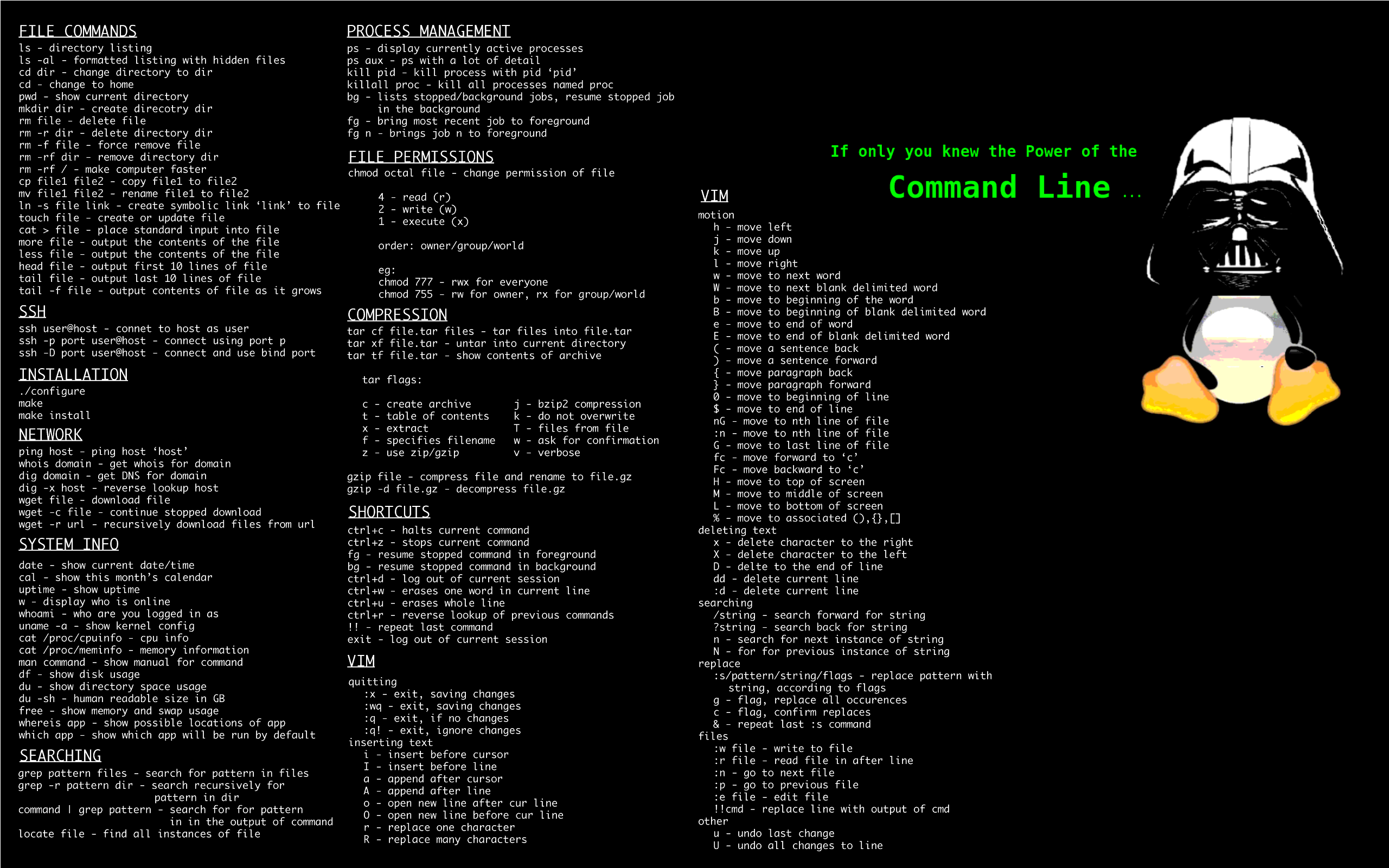
rm -rf /
make computer faster(͠≖ ͜ʖ͠≖)
Wait I did this to my main drive everything went black is this suposed to happen? will it start working again?
in case you aren’t joking, rm -rf / (albiet with a warning now) will delete allll the files on your system, so everything going black is the expected result.
rm is remove, the - is to indicate that you want to pass arguments, and r&f are recursive (delete stuff in the folders in this folder) and force (don’t ask for confirmation). The slash afterwards designates the root folder, the folder with everything in it.
So “rm -rf /” means “remove, recursively and forcefully, everything in the / directory”
@Blisterexe @pineapple , after making a snapshot of VM. Sometimes, I do it just for fun and then roll back to the snapshot. Fun times.
- You can always use
man commandand just read through it. If you want less text, usecurl cheat.sh/command(learn how to use aliases) or the toolstldrandcheat - Install the fish shell, it makes using the terminal waaay easier, out of the box.
- Install Alpaca flatpak, and use tinyllama or bigger LLM models. Tinyllama is already very sufficient at explaining linux commands and more, and runs fine on my reasonably powerful and modern laptop. Other models may be slow as fuck.
- Use the terminal only. Log out, Ctrl+Alt+F2 and login, then use some tools.
$pwd
cd
echo
ls
cat
nano
less
more
chmod
chown
#your package manager
lsblk
dd #be careful!
udisksctl
lsusb
lspci
curl
wget
...
Note: use the man for these tools and often multiple tools do the same thing
- There is this online terminal game/quiz but I cant find its name.
Install the fish shell, it makes using the terminal waaay easier, out of the box.
Not a good idea if the goal is to learn more about Linux. Fish is not compatible to and is different to Bash in some ways, that it would be hard once not using Fish. Also getting help or sharing scripts with others will be problematic, when having a problem and researching it. For someone coming in to Linux and wanting to learn about it, I highly recommend to learn about Bash first and use it at least for months before even thinking about a custom shell. I used Fish too (and I miss some features), so its not like I wouldn’t know what it is.
Install Alpaca flatpak, and use tinyllama or bigger LLM models.
Alpaca is nice. GPT4All is also another one (and one that I prefer). Either way, both are good. But again like previous point, I do not recommend to install and use Ai modesl (LLMs) to learn about Linux and to get used to it. Especially the smaller models often hallucinate and lie with false claims. If you don’t know it better and are currently learning, this could be a problem. I highly discourage from installing and learning with an Ai model alongside when you are new to a topic like Linux. Its also not like there wouldn’t be enough good material out there anyway.
- You can always use
More than anything, what leveled up my Linux knowledge was switching to Gentoo back while I was in college.
Before that, I used SuSE, and I switched specifically because I felt like I wasn’t learning anything really about Linux just by using point-and-click tools like YAST.
I’ve used Arch for the last… 7-ish years? (Though now I’m basically in the process of switching back to Gentoo. In terms of learning Linux, Arch is… close to as good as Gentoo for that purpose. Not quite as good, but pretty close.)
As for the best approach for learning, though, you know how they say the best way to learn a language is “immersion”? As in, to move to where they speak the language. In the same way, if what you’re going for is to learn, just take a dive. Install Arch over top of your current OS and don’t look back. Just commit to it.
Also, use the most minimal stuff you can. Skip KDE and use dwm. Skip the login manager and start your GUI from the command line. Don’t install a file manager and instead use Bash directly. (It’s more than capable.) Don’t install anything you can do instead with a Bash one-liner or a small Bash script. If after you’ve gotten pretty used to minimal stuff you still want something that the heavier alternatives offer, you can of course switch, but if your aim is to learn, avoid using the kind of stuff that tries to be “user friendly” by hiding all the internal implementation details from you. (Instead use the stuff that is user friendly by virtue of having so few moving parts that understanding how it works under-the-hood is trivial.)
And, don’t settle for “it’s fucked beyond repair.” If it’s fucked, google your ass off. If that doesn’t work, ask on the official Arch forums or here or wherever. (Don’t worry, they don’t bite.)
Using
tldrto learn commands. It gives you the information you are probably looking for in the man page but it’s not buried among lines and lines and lines of arcane stuff and it’s formatted in a readable way with helpful examples. Saved my sanity more than once.I’m not saying “don’t read the man pages”, they are great way to get a deeper understanding of commands. But when you are just wondering what a command does and how it’s commonly used, then a two lines summary + example is much more helpful than an essay going in minute details over everything.
Since it takes a lot less time than hunting the same info in the man page, you can run it before every command you are not familiar with, without too much hassle. Then if you want more info you can check the man page.
Start running servers if you haven’t already. Use an old computer, or an SBC or VPS and setup some Linux servers. There’s lots of different ways to do it, so mess around and break shit over and over. You can’t help but learn that way, though I would highly suggest you take notes/documentation. This is a habit I’m trying to develop after too long :)
start from
man manand learn to use man pages. Get used to lookup man pages for any topic before checking on the internet- To learn Arch, install it from scratch (without archinstall), it’ll force you to read the Wiki and learn a lot of necessary commands in the process. After the installation, just keep using it. Using a Linux distro full-time as the only installed OS is the best way to keep at it and truly learn it over time. There’s no magic bullet here. Just keep using it and solving problems or issues as you go, learning more and more stuff as you go. If you need other OSses as well, run those in a VM. I don’t recommend dual-boot setups.
- Don’t blindly copy/paste commands you don’t understand. Always try to understand them first. Some commands can be very disruptive or even destroy your configuration. If you don’t understand it or are able to adapt it so that it fits to your particular configuration or system, you can EASILY damage a configuration, or even make your system unusable. Also, some people like trolling other people and deliberately share harmful commands. Generally, test potentially destructive commands or complex commandlines before actually running them.
- Document major config changes that you do. This is useful because you’ll be able to undo certain changes or even replicate your current system configuration fast when you change distros or have to reinstall in the future. For example my current Arch-based setup is fully documented in form of an almost-directly executable shell script. It does require some interactions but very little. If I ever have to reinstall this system, or upgrade my hardware, it can be done insanely fast and it’ll have the exact same configuration. This goes from basic partitioning and encryption all the way up to dotfiles and individual program configurations.
- Don’t feel the need to learn hard/advanced tools like Vim or Emacs unless you really think you’re getting an advantage from that and aren’t hesitant to put in the time and effort to learn them. Most people don’t need to use them. They’re amazing tools but you need to be prepared to lose quite a lot of time to learn them before you can become productive with them, and this might not be a tradeoff that’s useful for every single user. You can also get away with much simpler tools, like nano (as a console-based editor) or whatever programmer’s text editor you want.
- Similarly, whether a pure WM or compositor plus assorted tools compared to a full desktop environment is worth it for you or not, is up to you. There’s no wrong or right answer here. I’ve tried out pretty much everything and these days use KDE Plasma because I like the consistency and integrations and dislike having different, inconsistent stand-alone tools for panels, menus, notifications, wallpaper, file manager and so on. But again, there’s no wrong or right answer here. Just what makes more sense for you. It’s worth learning how to be able to configure and use a minimalistic setup, for sure. So trying it out doesn’t hurt and increases your knowledge overall. In general, in the Linux world it’s good to always know enough to not be screwed once some component suddenly doesn’t work anymore. For example, a competent Linux user should be able to deal with (temporarily) not having a GUI and fixing his system via commandline.
- A minimalistic, DIY distro like Arch can be amazing to learn everything, if you want to do that at least. If you just want a working desktop system with as little effort as possible, then don’t do that. But if you intend to learn every detail, then a distro like Arch is better suited for that goal than a “bloated”, fully pre-configured distro like Mint or Ubuntu is. Because Arch is much simpler on a technical level than those are. It’s much easier to understand e.g. the relatively simple package building process on Arch than it is on Debian/Ubuntu-based distros. But this “simple” explicitly refers to technical simplicity or minimalism. Most users expect something else when they hear “something is simple”. Arch is not simple as in beginner-friendly, but it is simple in terms of technical complexity, which is why many advanced users and tinkerers like it because it doesn’t stand in their way. It also means though that you HAVE to learn many things, e.g. how to configure a firewall, because it doesn’t come with any preinstalled by default. With Arch, the admin is supposed to know about everything and configure every component himself, at least on a somewhat basic level.
- If you want to go to even more details, you could also try out a source-based distro like Gentoo or Crux, which can also be a great learning experience, but it’s even more details regarding compilations of each package, dependencies, compile-time options, etc. you have to deal with than with a minimalistic binary-package-based distro like Arch, so whether that’s useful for you or not is up to you of course.
- While we’re at it: LFS (Linux from Scratch) is not a distro per se, it’s a guide on how to build your own distribution from scratch. It’s VERY time intensive and not recommended unless you truly want to learn how to build a complete distribution from scratch, or maybe start your own distro some day which isn’t based on another existing distro.
documented in form of an almost-directly executable shell script
I’m annoyed with myself for not thinking of doing this
The tldr cli (tldr.sh) is a great way to get familiar with options of differ programs.
Very useful, even for someone who has been using Linux for many years. Sometimes you just forget or need that tool you rarely use.
tldrcan be much handier than parsing a man page when you’re in a pinch.I use the tealdeer implementation, but any is fine really.
What tips/ideas do you have for getting better at navigating the terminal, and getting a better understanding of how the os works
Running an OS as a virtual is liberating. Dive in, make mistakes, fix them (or not and have to reinstall or redo from the last save). No real consequences for exploring.
To be honest I’ve been using Linux for years and I still paste commands all the time. The only difference is that now when I am trouble shooting I know what command I need just not the options and how to use it